Introduction
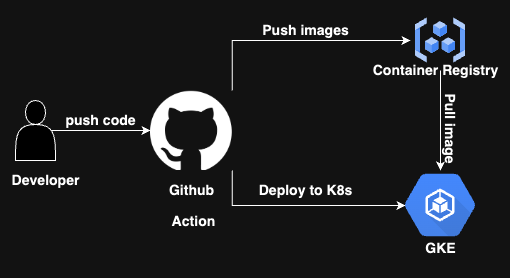
In the realm of DevOps, the separation of application code from infrastructure code has become a cornerstone principle. This article will guide you through a GitHub Actions workflow that embodies this separation, deploying applications to Google Kubernetes Engine (GKE) using Kustomize for manifest customization. We'll explore future implementations to enhance our CI/CD pipeline further.
Table of Contents
Introduction
The Workflow Trigger
Environment Setup
The CI/CD Pipeline
Future Implementations and Enhancements
Conclusion
The Workflow Trigger
Our workflow is designed to be initiated when a pull request is merged into specific branches:
name: cicd-pipeline
on:
  pull_request:
    types:
      - closed
    branches:
      - main
      - development
      - staging
This ensures that the CI/CD process is initiated only when code changes are finalized and ready for deployment.
Environment Setup
Before diving into the CI/CD steps, the workflow sets up environment variables:
env:
  DEPLOYMENT_NAME: ${{ secrets.DEPLOYMENT_NAME }}
  GCP_PROJECT_ID: ${{ secrets.GCP_PROJECT_ID }}
  GCP_GAR_LOCATION: ${{ secrets.GCP_GAR_LOCATION }}
  GCP_GKE_CLUSTER: ${{ secrets.GCP_GKE_CLUSTER }}
  GCP_GKE_ZONE: ${{ secrets.GCP_GKE_ZONE }}
  GCP_REPOSITORY: ${{ secrets.GCP_REPOSITORY }}
  GCP_GKE_SA_KEY: ${{ secrets.GCP_GKE_SA_KEY }}
  GCP_GIT_K8_INFRA_ACCESS_SSH_SECRET: ${{ secrets.GCP_GIT_K8_INFRA_ACCESS_SSH_SECRET }}
These variables, some fetched from GitHub Secrets and Environments(place Secrets as Organizations as it may be hectic to add to every repository), provide the necessary context and credentials for the subsequent steps.
Here are the ENVs and what they mean.
DEPLOYMENT_NAME: Assign a deployment name for your application, which will be in Kubernetes deployment.GCP_PROJECT_ID: Sets the Google Cloud Project ID.GCP_GAR_LOCATION: Specifies the location of the Google Artifact Registry.GCP_GKE_CLUSTER: Identifies the Google Kubernetes Engine cluster.GCP_GKE_ZONE: Sets the Google Kubernetes Engine cluster's zone.GCP_REPOSITORY: Identifies the Google Cloud repository.GCP_GKE_SA_KEY: Provides the Service Account Key for Google Kubernetes Engine.GCP_GIT_K8_INFRA_ACCESS_SSH_SECRET: Sets SSH access secret for Google Kubernetes infrastructure Manifest located in a separate private repository.
The CI/CD Pipeline
Checkout Code: The workflow starts by checking out the latest code from the repository.
 jobs:
   setup-build-publish-deploy:
     if: github.event.pull_request.merged == true
     name: Setup, Build, Publish, and Deploy
     runs-on: ubuntu-latest

     steps:
     - name: Checkout
       uses: actions/checkout@v3
Authenticate with GCloud: To interact with Google Cloud services, the workflow authenticates using a service account key.
     - name: Authenticate with GCloud
       uses: google-github-actions/auth@v1
       with:
         credentials_json: ${{ secrets.GCP_GKE_SA_KEY }}
Configure Docker for GCloud: This step ensures Docker can push images to Google's Artifact Registry.
 - name: Configure Docker for GCloud
   run: gcloud auth configure-docker $GCP_GAR_LOCATION-docker.pkg.dev
Build and Push Docker Image: The application is containerized, and the resulting Docker image is pushed to the Artifact Registry.
 - name: Build and Push Docker Image
   run: |
     docker build --tag "$GCP_GAR_LOCATION-docker.pkg.dev/$GCP_PROJECT_ID/$GCP_REPOSITORY/$DEPLOYMENT_NAME:$GITHUB_SHA" --build-arg GITHUB_SHA="$GITHUB_SHA" --build-arg GITHUB_REF="$GITHUB_REF" .
     docker push $GCP_GAR_LOCATION-docker.pkg.dev/$GCP_PROJECT_ID/$GCP_REPOSITORY/$DEPLOYMENT_NAME:$GITHUB_SHA
Setup Kustomize: Kustomize is downloaded and set up. It will be used later for customizing Kubernetes manifests.
 - name: Setup Kustomize
   run: |
     curl -sfLo kustomize https://github.com/kubernetes-sigs/kustomize/releases/download/v3.1.0/kustomize_3.1.0_linux_amd64
     chmod +x kustomize
     sudo mv kustomize /usr/local/bin/
Get GKE Credentials: To deploy to GKE, the workflow fetches credentials for the Kubernetes cluster.
 - name: Get GKE Credentials
   uses: google-github-actions/get-gke-credentials@v1
   with:
     cluster_name: ${{ secrets.GCP_GKE_CLUSTER }}
     location: ${{ secrets.GCP_GKE_ZONE }}
Clone k8s-infra and Deploy: The
k8s-manifestrepository, which contains Kubernetes manifests, is cloned using a deploy key. Then, Kustomize customizes the manifests, and the application is deployed to GKE.- name: Clone k8s-manifest and Deploy env: SSH_PRIVATE_KEY: ${{ secrets.GCP_GIT_K8_INFRA_ACCESS_SSH_SECRET }} run: | mkdir -p ~/.ssh echo "$GCP_GIT_K8_INFRA_ACCESS_SSH_SECRET" > ~/.ssh/id_rsa chmod 600 ~/.ssh/id_rsa ssh-keyscan github.com >> ~/.ssh/known_hosts git clone git@github.com:callmedevops/k8s-manifest.git cd k8s-manifest/github-actions/$DEPLOYMENT_NAME/$ENVIRONMENT kustomize edit set image $GCP_GAR_LOCATION-docker.pkg.dev/$GCP_PROJECT_ID/$GCP_REPOSITORY/$DEPLOYMENT_NAME:$GITHUB_SHA kustomize build . | kubectl apply -f - kubectl rollout status deployment/$DEPLOYMENT_NAME
Future Implementations and Enhancements
ArgoCD Integration: ArgoCD is a declarative, GitOps continuous delivery tool for Kubernetes. By integrating ArgoCD, application deployments become declarative, where the desired application state is versioned in Git, eliminating the need for scripts and manual interventions.
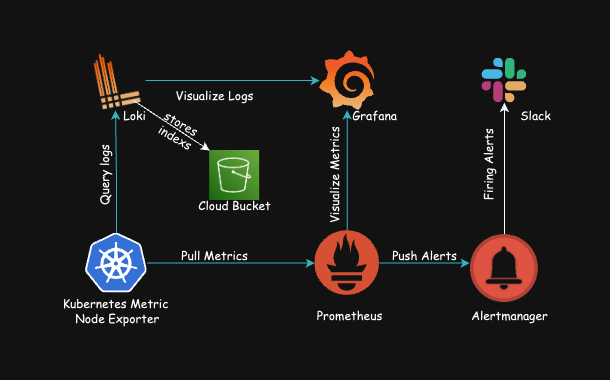
Enhanced Monitoring with Prometheus and Grafana: Monitoring is crucial for any application in production. By integrating tools like Prometheus for monitoring and Grafana for visualization, you can get real-time metrics on application performance and set up alerts for any anomalies.
Automated Testing with SonarQube: SonarQube can be integrated into the CI/CD pipeline for continuous inspection of code quality. It detects bugs, vulnerabilities, and code smells across project branches and pull requests.
Infrastructure as Code with Terraform: While our current setup uses Kustomize for Kubernetes manifest customization, we can further enhance infrastructure management using tools like Terraform. Terraform allows you to define and provide data center infrastructure using a declarative configuration language.
Conclusion
Our GitHub Actions workflow provides a robust foundation for CI/CD, but the world of DevOps offers many tools and practices to refine and enhance this process. By considering integrations like ArgoCD, Prometheus, Grafana, SonarQube, and Terraform, we can ensure a more efficient, scalable,
About the author
a Rust enthusiast and DevOps expert with extensive experience in AWS, GCP, Kubernetes, continuous integration, automated deployments, and in